

When it comes to making your website successful, a lot depends on how well it performs. A fast, smooth, and easy-to-use website can make a big difference in how visitors interact with your content. This is where Core Web Vitals become essential. These are specific metrics that Google uses to measure the user experience on your website. By focusing on these metrics, you can greatly improve your software performance and, as a result, boost your search engine rankings.
What Are Core Web Vitals?
Core Web Vitals are a set of three specific metrics that are crucial for understanding the quality of user experience on your website. The three primary metrics that make up Web Vitals are:
- Largest Contentful Paint (LCP): Largest Contentful Paint tracks how long it takes for the most important part of a webpage to fully load. A quicker LCP allows users to engage with the content sooner, providing a more enjoyable experience.

- First Input Delay (FID): This metric evaluates the responsiveness of your website. It measures the time from when a user first interacts with your site (such as clicking a link or button) to when the browser responds to that interaction. A low FID indicates that your website is interactive and responsive, which is crucial for keeping users engaged.

- Cumulative Layout Shift (CLS): Cumulative Layout Shift (CLS) gauges how stable your website’s visual elements are.It tracks how often elements on your page move unexpectedly while loading, which can be frustrating for users. A low CLS score means that your site is visually stable, providing a smoother experience for visitors.
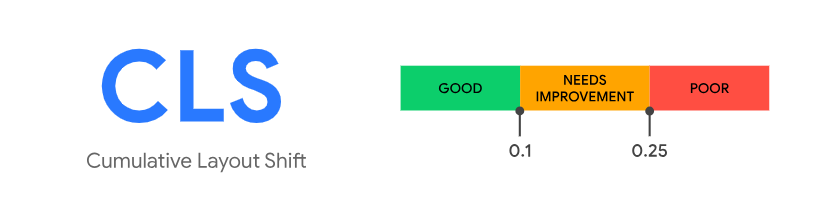
Understanding these web vitals metrics is the first step in ensuring your site is user-friendly and meets Google’s standards for a good user experience.
The Importance of Optimizing Website Performance
Optimizing your website’s performance is essential for a few reasons. First, a faster website provides a better experience for users. When your site loads quickly, visitors are more likely to stay longer, explore more pages, and engage with your content. Second, Google has made it clear that Google Core Web Vitals are now a significant factor in search rankings. Websites that perform well on these metrics are more likely to rank higher in search results, giving you a competitive edge.
How To Improve Core Web Vitals?
Step 1: Analyze Your Website Performance
Start by checking how your website is currently performing. Tools like Google Analytics can help you spot areas that need improvement, such as page load times.
Step 2: Optimize Your Images
Large or improperly formatted images can slow down your website. Ensure your images are the right size and format for quicker loading times.
Step 3: Enable Browser Caching
Set up browser caching to save your website’s files on visitors’ devices, speeding up load times when they return to your site.
Step 4: Minimize CSS and JavaScript
Reduce the size of your CSS and JavaScript files by removing unnecessary elements. The crucial step is to optimize website speed by minimizing JavaScript. Too much JavaScript can cause delays in how quickly users can interact with your site. Reducing the amount of JavaScript and deferring non-essential scripts can help improve the first input delay metric. Lastly, ensuring that your website’s layout is stable as it loads is essential. You can do this by setting size attributes for images and videos or using CSS to reserve space for dynamic content. This will help improve the cumulative layout shift metric and make your site more user-friendly.
Step 5: Address Layout Shifts
Prevent layout shifts by ensuring all elements, like images, have defined sizes. This will make your site feel smoother and more professional.
Step 6: Sort Issues by Label
Organize any issues by priority, so you can tackle the most critical ones first, keeping your workflow efficient.
Step 7: Make a List
Create a to-do list of tasks to improve your website. This will keep you on track and ensure nothing is overlooked.
Step 8: Share Common Fixes
After making improvements, share your successful solutions with others. This can help others and might bring new insights to you as well.
Core Web Vitals Best Practices
To fully optimize your website for Core Web Vitals, it’s essential to follow some best practices. Regularly audit your site using tools like Google’s PageSpeed Insights or Lighthouse to identify areas that need improvement. These tools provide detailed reports on how your site performs against Core Web Vitals metrics and offer suggestions for improvement.
Another best practice is to prioritize mobile optimization. With more users accessing websites via mobile devices, ensuring that your site is responsive and performs well on smaller screens is crucial. This includes optimizing for touch interactions, ensuring fast load times, and maintaining a stable layout.
Enhancing Website Performance for SEO Success
Enhance Website Performance by focusing on SEO Core Web Vitals is not just about meeting Google’s requirements; it’s about creating a better experience for your users. A well-optimized website can lead to increased user engagement, higher search rankings, and ultimately, more conversions. By following Core Web Vital’s best practices and continuously monitoring your site’s performance, you can ensure that your website remains competitive in an ever-evolving digital landscape.
Read More-: Top Strategies For Generating Website
